
- Image via Wikipedia

When looking at a website for on-page content structure in terms of HTML/code, you can easily find out by going to the page and looking it up within your browser.
Just use the “View Source” or “Page Source” options, and you’ll see the code and structure. It is a quick view into your code foundation and layout.
You’ll see actual code, external references, naming conventions, image use, meta tag use and much more.
However, if you have a site with many pages (I hope so!), and you’d like to quickly see if the SEO ‘best practice’ of having meta tags in place, what they are, and what to change – it becomes a lot of work. Especially if you have a large website with hundreds of pages. (Architecture of your website is for another post!).
How can you quickly view the SEO meta tag information for each page? You need a web spider.
Here is one simple way to get the meta information for each page from your website.
If you are a programmer, you can write a web spider from scratch. I wrote a simple one in Visual Basic a while back. And, it’s even easier if you license (buy) existing source code with modules or code classes you integrate into your programming project. You can even use open source solutions.
It doesn’t matter if it’s C++, Visual Basic, PHP, Python/Perl, many controls are available. You could write a web interface or a desktop interface to spider pages on your website, or hire it out completely. oDesk and Freelancer.com are options you can look into.
Or, you can just buy a complete package, done for you – like in the example below.
I picked a random local URL, https://www.runasnailspace.com/. (Not surprising, it’s highly “un-optimized”)
There are 3 simple steps to the meta extraction process:
Step 1: URL setup
Enter the URL you want to spider. Exclude spidering of all external links. Set the depth of link spidering and total pages. Try to manage settings. If not, it’ll take a very long time for a large site, and it’s probably not that useful either.
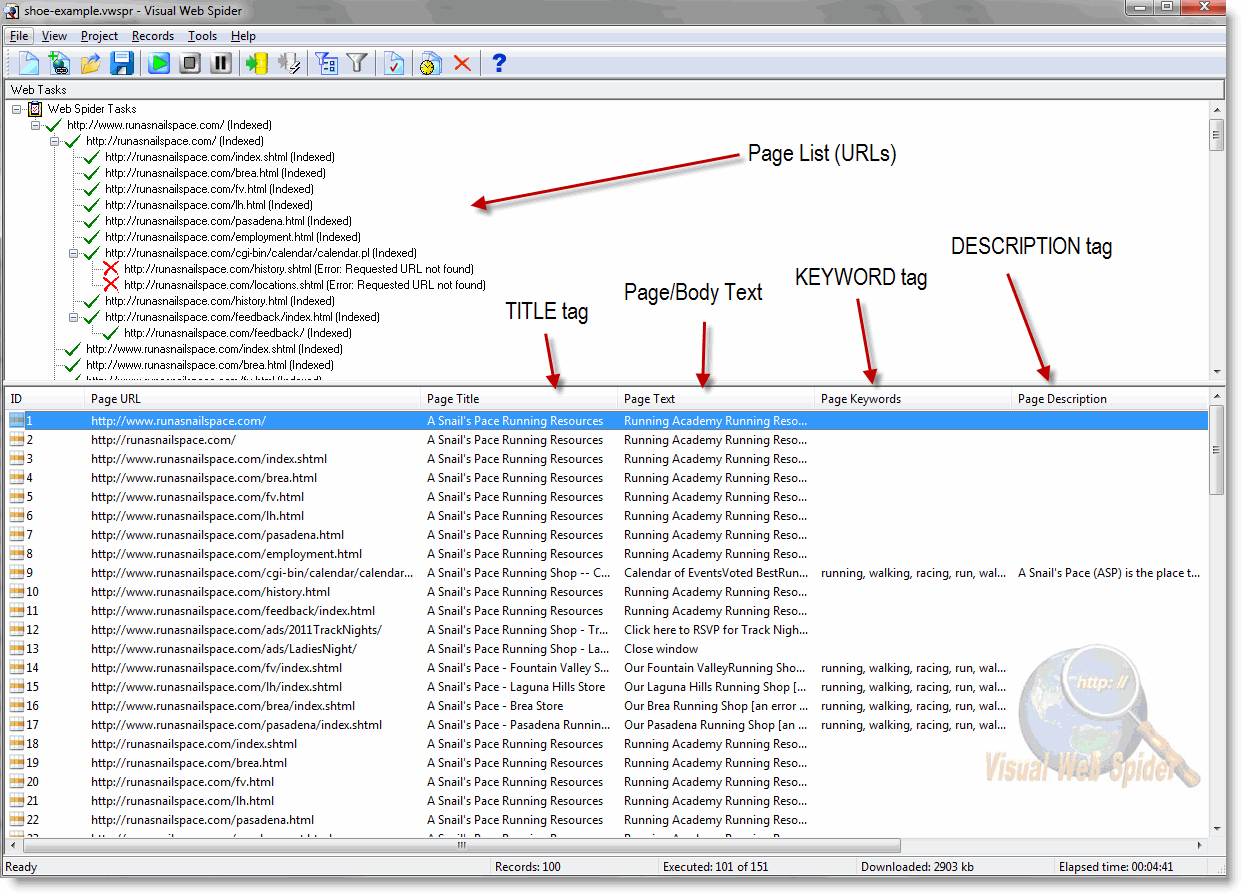
(click here for a larger view)
Step 2: Review
Take a quick look at the results you get. From the URL example above, you can see the duplication of TITLE tags, missing DESCRIPTIONS and more. If somehow the spidering results are not what you expect, go back and play with the settings again. You should see something like in the above picture, and not a bunch of external URLs.
Step 3: Export & SEO tag change management
Clearly, if you only have a couple of pages to manage, you can do this manually. But, you are not – so – go ahead and export to Excel or any other database (MS-Access, for example). I like to use Excel. It’s portable, and it’s easy to manage in a group. The extraction from above will have all current settings. Add new columns in that Excel worksheet, with similar headers. Just prefix them with “new” and add the proper tags, TITLEs & DESCRIPTIONs.
Voila – you got a great system for managing and tracking your SEO meta tag work.
Here’s the link to the web spider tool – and it’s free to try up to 100 pages. This is just one of many potential tools, free and paid. (what others do you use?). Search in Google for ‘meta tag extractor’ also. You can also buy it directly or download here.

Does this help you?
Related articles
- A Beginners Guide to Meta Tags (dailyseotip.com)
- The meaning of all the different meta tags & how to use them – meta tags search engine promotion (metatags.org)
- SEO Shocker: 10 Reasons to Use the Meta Keywords Tag! (zdnet.com)
- Ding Dong! The Keywords Meta Tag is Finally Dead! (seo-theory.com)

About jon rognerud
BOOK YOUR CALL NOW: Click Here For Schedule Sign up for a FREE breakthrough session Learn More About Our Online Sessions.
===
Entrepreneur Magazine says Jon Rognerud is one of the most sought-after Digital Marketing Experts. His clients extend from high-end brands and middle-tier businesses in both B2B and B2C. His SEO website optimization book, "The Ultimate Guide to Optimizing Your Website" from Entrepreneur Press is in bookstores now.